


Simple Checkbook Ledger
3.41.24K Reviews
App Specs
- Version
- 3.5
- Updated On
- License
- Free
- Downloads
- 100,000+
- Developer
- Teelu Apps
- Categories
- Finance
- Platform
- Android
Screenshots
 Analysis by AppCompare
When I try to keep track of everyday spending, I do not always need a full banking platform. Sometimes I just want a clear running balance, a place to record a payment, and a quick way to see where my money went. That is the space occupied by Simple Checkbook Ledger, a free finance app from Teelu Apps built around the familiar checkbook-ledger idea.
After using it as a lightweight spending record, I found its main value easy to understand: it encourages me to enter transactions as they happen instead of waiting for a bank statement and trying to reconstruct a month from memory. That sounds modest, but it changes the way I notice small purchases. The app is not trying to replace a bank, investment service, or complete household budgeting suite. Its usefulness comes from staying focused.
It has been available since Aug 3, 2016, and the current version is 3.5. The app has passed 100K installs, with a 3.4 average from around 2.5K ratings and about 1.2K written reviews. Those figures suggest a product with a real user base but also a mixed experience, which matches my impression: the basic ledger concept is practical, while people wanting a modern, automated money dashboard may find it limited.
Why the ledger approach still works
I still find the ledger approach useful because it turns spending into a sequence of decisions I can review, rather than a balance I only notice after the fact. In this section, I look at why that simple record can remain valuable even alongside banking apps, and where its manual nature asks more of me. The key is treating each entry as a timely commitment, not merely a note for later.
A running balance makes spending visible
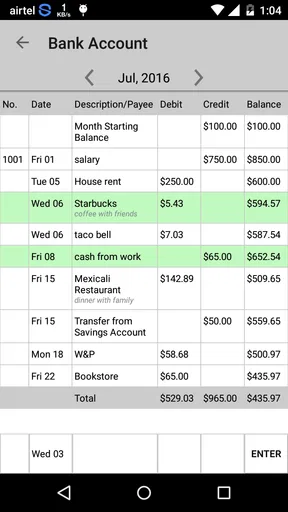
The central capability is manual account tracking. I enter a financial movement, identify what it represents, and use the resulting ledger to understand the balance I should have available. The important distinction is that this is an active record rather than a passive feed. A bank app tells me what has already reached the account; a checkbook ledger asks me to record the commitment when I make it.
That difference matters with payments that are easy to forget. A card purchase, cash withdrawal, bill, or check can reduce the money I mentally consider available before the transaction is fully reflected in a bank balance. By recording it immediately, I get a more realistic picture. The app therefore works best when I treat it as a personal control panel and keep it current.
I also like the psychological effect of a ledger. A long list of individual transactions is less vague than a single monthly total. Seeing several small entries close together can reveal a spending habit that would otherwise disappear inside a statement. The app does not need elaborate analysis to make that useful; the act of writing down the expense creates accountability.
Worth Reading Before You Choose

EA SPORTS FC Mobile 26 Is a Bigger Football Game, but It Takes Time

Flipboard Shows What News Apps Must Do Beyond the Feed

Switching to Android Auto Means Rethinking Your Driving Routine

Google Calendar Makes a Crowded Week Easier to Manage

Ludo King Makes the Most of the Minutes Between Plans

Baby Panda World Brings Quick Play to Modern Phones, but Its Game Library Feels Busy
Manual entry is both the strength and the responsibility
The same design that keeps the app simple also creates its main obligation: I have to enter the information myself. There is no benefit in expecting a ledger to know about a purchase I never recorded. For users who want automatic synchronization, account aggregation, or a continuously imported transaction history, a conventional banking app or a dedicated budgeting service will be a better fit.
For me, manual entry is most effective when I use a consistent routine. I record a purchase before moving on, rather than promising myself that I will remember it later. I use recognizable descriptions, keep similar expenses named in a similar way, and check the balance after entering anything unusually large. These small habits make the ledger much more useful than a collection of rushed notes.
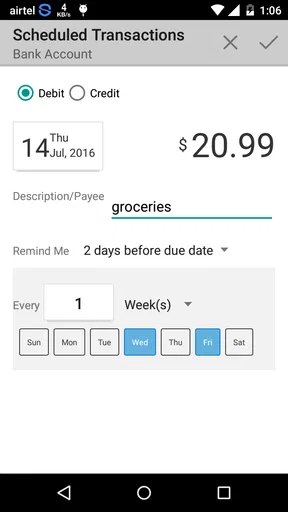
A helpful but less obvious use is recording pending commitments before they clear. If I have scheduled a payment or written a check, I can account for it in my working balance instead of spending money that is technically still visible in the bank account. This is where a simple ledger can outperform a basic bank balance for day-to-day decisions, even though it requires more discipline.
It is a record, not a financial adviser
I would not install this app expecting recommendations about debt, savings, investments, taxes, or credit. Its strength is transaction awareness, not financial planning. That narrow purpose is a benefit for someone who finds large finance apps distracting, but it is a limitation for anyone who wants charts, forecasts, automatic categories, or a complete view of several financial products.
The app is also not a substitute for checking the official account. A manually maintained balance can be wrong if I miss an entry, duplicate one, mistype an amount, or forget a fee. I use the ledger to organize my own record and compare it with the bank when necessary. That distinction is important because a clean-looking balance is not automatically a verified balance.
How I use it in an ordinary week
My weekly routine is less about entering every detail perfectly and more about creating a dependable checkpoint before small expenses blur together. Here I focus on how I would fit the ledger around ordinary errands and payments, including a practical way to catch missed entries before they distort the balance. That routine matters most when I can make it brief enough to repeat.
Starting with a small account setup
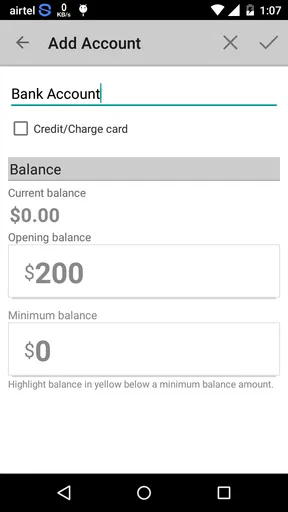
I get the best results by resisting the urge to make the ledger complicated at the beginning. I start with the account I actually want to monitor, establish the correct opening amount, and then enter new activity in chronological order. If the first balance is wrong, every later calculation becomes harder to trust, so the initial setup deserves more attention than it seems to need.
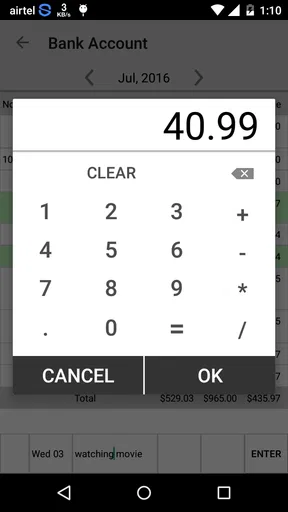
When I add a transaction, I think about three questions: what happened, when did it happen, and how will I recognize it later? A description such as “store” is less helpful than a short, specific label. Clear wording makes the history useful when I review it days later, especially if several purchases have similar amounts.
I also avoid using the ledger as a place for vague estimates. If I am unsure whether an expense was forty or sixty dollars, I would rather verify it before treating the entry as final. A checkbook-style record is valuable because it is concrete. Loose approximations can create false confidence.
A realistic payday and grocery scenario
Imagine that I receive my regular income and immediately need to cover groceries, a utility payment, fuel, and a few smaller card purchases. My bank may show the income quickly, while some outgoing transactions appear at different times. I enter each expense in Simple Checkbook Ledger as it occurs, including payments that I know will clear later.
By the time I consider buying something optional, I am looking at a balance that reflects my commitments rather than only the transactions already processed. That is the app’s most practical everyday effect. It reduces the gap between “money visible in the account” and “money genuinely available to spend.”
At the end of the week, I review the entries and compare them with the account activity. If the numbers disagree, I look for the ordinary causes first: a forgotten cash purchase, a duplicated entry, a fee, or a transaction still pending. This reconciliation habit is more important than any single screen because it keeps the ledger dependable over time.
Using categories without turning the app into a project
I find it tempting to create an elaborate classification system, but that can make manual tracking tiring. A smaller set of meaningful labels is usually better. I might distinguish groceries, transport, household bills, and discretionary spending, while leaving out distinctions that do not change a decision.
The useful question is not whether every transaction has a perfect label. It is whether the record helps me answer something practical, such as why the balance fell faster than expected or which recurring expense needs attention. If a category does not influence what I do next, it may not be worth the extra effort of maintaining it.
This is one of the app’s quiet trade-offs. Its simplicity leaves room for my own method, but it does not force a sophisticated budgeting framework around me. People who enjoy building a personal ledger can appreciate that flexibility. People who want the app to interpret their spending automatically may experience the same flexibility as extra work.
Handling multiple accounts carefully
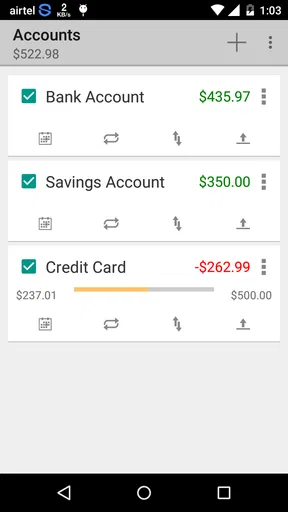
Users with more than one account should decide whether they want separate records or one combined view before entering a lot of history. A separate ledger for everyday spending and another for a reserve account can make balances easier to understand. Combining everything may look convenient, but it can hide the difference between money that is immediately spendable and money that should remain untouched.
There is also a practical reason to keep the structure simple: manual records become harder to reconcile as the number of accounts grows. I would use this app for a small, clearly defined set of accounts rather than attempting to reproduce every financial relationship in one place. Someone managing business accounts, investments, credit cards, loans, and shared household money may need a more specialized tool.
What the age rating and cost mean in practice
The app is rated Everyone, which fits its straightforward personal-finance purpose. It is free to use, and optional in-app purchases are listed at $1.99 per item. That makes it easy to try without committing to a subscription-style expense, although I would still check which optional elements matter to my own workflow before paying for anything.
It requires OS 11 or later. For a person using an older device, that requirement may decide compatibility before the ledger itself can be evaluated. On a supported phone, the low entry cost makes experimentation reasonable: I can test whether manual tracking suits me instead of paying for a larger budgeting system first.
Where the focused design helps most
A focused design helps most when I want one clear answer—how much of this account is already spoken for—without turning money tracking into a second job. In this section, I consider the kinds of decisions that benefit from that narrow view and the point at which a broader tool becomes more useful. The distinction helps me choose the app for a specific role rather than expect it to do everything.
People who want a spending checkpoint
The strongest audience is someone who already knows the basics of personal money management but wants a reliable checkpoint between purchases and the bank statement. I would recommend it to a person who often thinks, “I know I spent it, but I cannot remember on what,” or who needs to account for pending payments when deciding what is safe to spend.
It can also suit someone moving away from paper records. The checkbook idea is familiar, but a phone is easier to carry and update during the day. A manual ledger may feel less intimidating than a dashboard full of graphs, alerts, and connected accounts, particularly for a user who wants to build the habit first.
Another good match is a person with one main spending account and relatively predictable finances. The fewer moving parts I need to track, the more likely I am to keep the entries accurate. In that setting, the app’s narrow purpose feels like a deliberate advantage rather than a missing feature.
When a different finance app is the better choice
I would skip it if automatic import is essential. Anyone who rarely remembers to record purchases will probably lose confidence in the ledger quickly. A bank app with transaction notifications, or a budgeting service that connects accounts, may be more suitable for that person even if it offers a busier interface.
I would also choose another tool for detailed long-term planning. If I need debt payoff schedules, investment tracking, shared access, bill reminders, tax preparation, or advanced reports, a basic checkbook ledger is unlikely to cover the whole job. It may still be useful alongside those tools, but I would not make it the only financial application in a complicated situation.
Families should think about coordination as well. A ledger maintained by one person can become incomplete when another household member spends from the same account. Unless everyone follows the same recording routine, a shared budgeting product may provide better visibility. The issue is not that the ledger concept is weak; it is that manual accuracy depends on cooperation.
Three habits that make the app more dependable
- Record commitments, not just cleared transactions. Entering a payment when I make it gives me a more honest spending balance, especially when the bank takes time to process it.
- Reconcile on a regular rhythm. A short comparison with the official account catches omissions while they are still easy to identify, rather than allowing several weeks of uncertain entries to accumulate.
- Use descriptions for future recognition. A precise note helps me identify a transaction later without relying on memory, which is particularly useful when amounts repeat.
- Keep categories decision-focused. I only separate spending types when the distinction helps me change a habit, plan a payment, or understand a balance.
These habits are not flashy features, but they reveal the real trade-off of Simple Checkbook Ledger. The app can make a manual record feel orderly and useful, yet the quality of the result still depends on how consistently I use it. That is both its honesty and its limitation.
My view after using the ledger as intended
Simple Checkbook Ledger is at its best when I treat it as a focused transaction notebook with a running balance. The capability sounds basic, but it solves a specific problem well: helping me account for spending before a bank statement catches up. In an ordinary week, that can prevent an available balance from becoming misleading.
Its 3.4 average shows that it will not satisfy everyone, and I understand why. Manual entry takes effort, the narrow design will feel incomplete beside full budgeting platforms, and users with complex finances may quickly outgrow it. I would not recommend it as a universal money-management solution.
I would recommend it to a friend who wants a free, uncomplicated way to monitor one or a few accounts and is willing to maintain the record personally. The app is especially worthwhile for someone replacing a paper checkbook, controlling discretionary spending, or learning to separate cleared money from committed money. For those needs, its restraint is useful.
My final advice is to test the routine rather than judge the app after one quick launch. Enter transactions for several days, reconcile the balance with the bank, and see whether the process actually changes your decisions. If the habit feels manageable, this small finance app can become a practical daily safeguard. If manual tracking already sounds exhausting, an automated alternative will probably serve you better.
Pros
- Clean
- simple interface focused on everyday checkbook tracking.
- Works well for recording income
- expenses
- and account balances.
- Useful for users who prefer manual control over their finances.
- Ledger-style entries make transactions easy to review later.
- Lightweight design should run smoothly on most Android devices.
Cons
- Manual entry can become time-consuming for frequent transactions.
- May lack automatic bank syncing and real-time account updates.
- Limited budgeting tools compared with full-featured finance apps.
- Users may need to create regular backups to protect ledger data.
- The basic visual design may feel dated to some users.
FAQs for Simple Checkbook Ledger
What is Simple Checkbook Ledger used for?
Simple Checkbook Ledger is designed to help you record and monitor personal finances in a straightforward way. You can enter income, expenses, deposits, withdrawals, and other transactions, then review your running balance. It is particularly useful for people who still manage a checking account manually or want a simple companion to online banking without the complexity of a full budgeting platform.
Does Simple Checkbook Ledger connect directly to my bank account?
The app is primarily intended for manual checkbook and transaction tracking, so users should not assume that it automatically connects to their bank or imports transactions. You generally enter financial activity yourself and use the ledger to compare your records with bank statements. This approach can improve awareness and privacy, but it also means accuracy depends on keeping entries up to date.
Can I use Simple Checkbook Ledger for multiple accounts?
Depending on the version and platform edition, Simple Checkbook Ledger may allow you to maintain more than one ledger or account, such as checking, savings, cash, or a credit account. Before downloading, review the current store description and screenshots to confirm the exact account-management options. If you need detailed household budgeting or many synchronized accounts, check whether its simpler design meets your requirements.
Is Simple Checkbook Ledger suitable for managing a detailed budget?
Simple Checkbook Ledger can be helpful for tracking balances and recording everyday transactions, but it may not provide the advanced budgeting tools found in dedicated finance apps. Features such as automatic bank synchronization, extensive spending reports, investment tracking, bill reminders, or shared household planning may be limited or unavailable. It is best suited to users who prefer a focused, manual ledger rather than a complete financial dashboard.
Is my financial information safe when using Simple Checkbook Ledger?
Because you may enter sensitive financial details, you should review the app’s privacy policy, permissions, backup options, and data-handling practices before using it extensively. A manual ledger can reduce the need to share bank login credentials, but it does not remove all security risks. Use a device lock, keep the app updated, avoid entering unnecessary account details, and make regular backups if the app supports them.


